> ## Documentation Index
> Fetch the complete documentation index at: https://docs.beam.ai/llms.txt
> Use this file to discover all available pages before exploring further.
# Custom Integrations
> Build an integration for an internal or proprietary platform from the workspace Integrations page
When you need connections to proprietary systems, internal tools, or services not in Beam's integration catalog, custom integrations let you build direct API connections.
When to Build Custom Integrations
Connect proprietary business systems and internal platforms
Integrate industry-specific platforms not in the catalog
Work with custom-built APIs and microservices
Implement specialized authentication requirements
**Before Building:**
* Check if the service exists in Beam's 1500+ integration catalog
* Have API documentation ready (OpenAPI spec preferred)
* Confirm authentication credentials and permissions
Building a Custom Integration
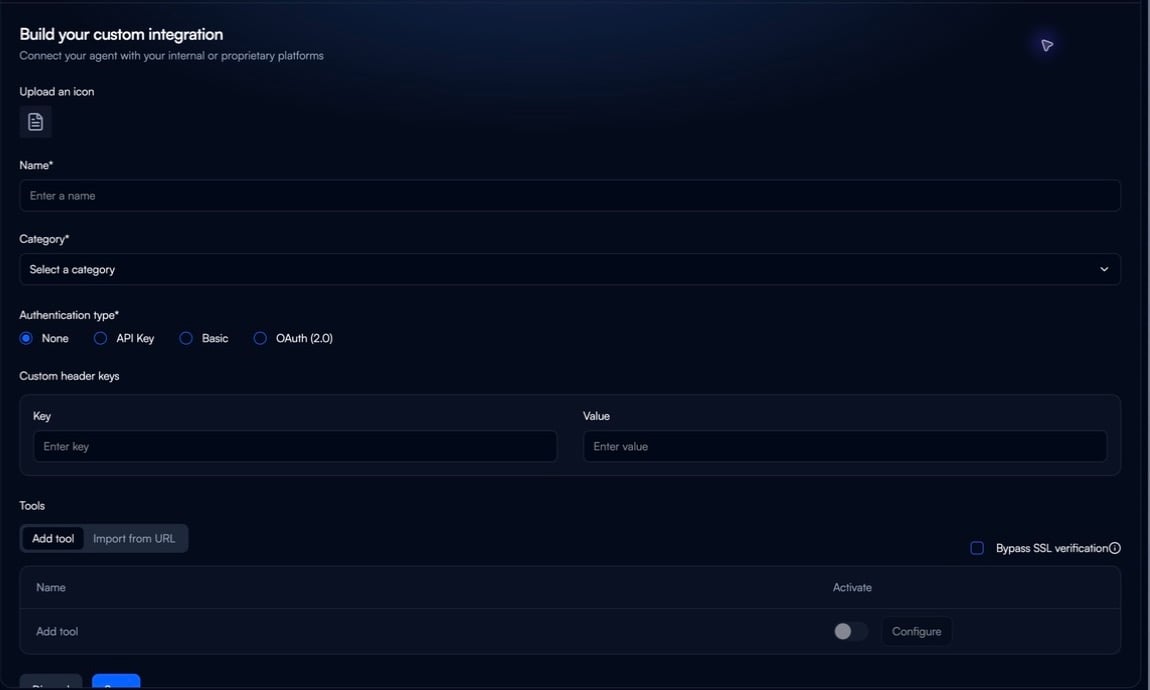
In the workspace sidebar, open **Integrations**, then select **Create custom integration**.
**Name**: Clear, descriptive (e.g., "Acme CRM API")
**Upload an icon**: Optional, for visual identification
**Category**: Select appropriate category for filtering
Select **None**, **API Key**, **Basic**, or **OAuth (2.0)**. Add any required custom header keys and values in the header table.
Choose **Add tool** for manual tool setup or **Import from URL** to start from a specification URL. The builder also provides a **Bypass SSL verification** option.
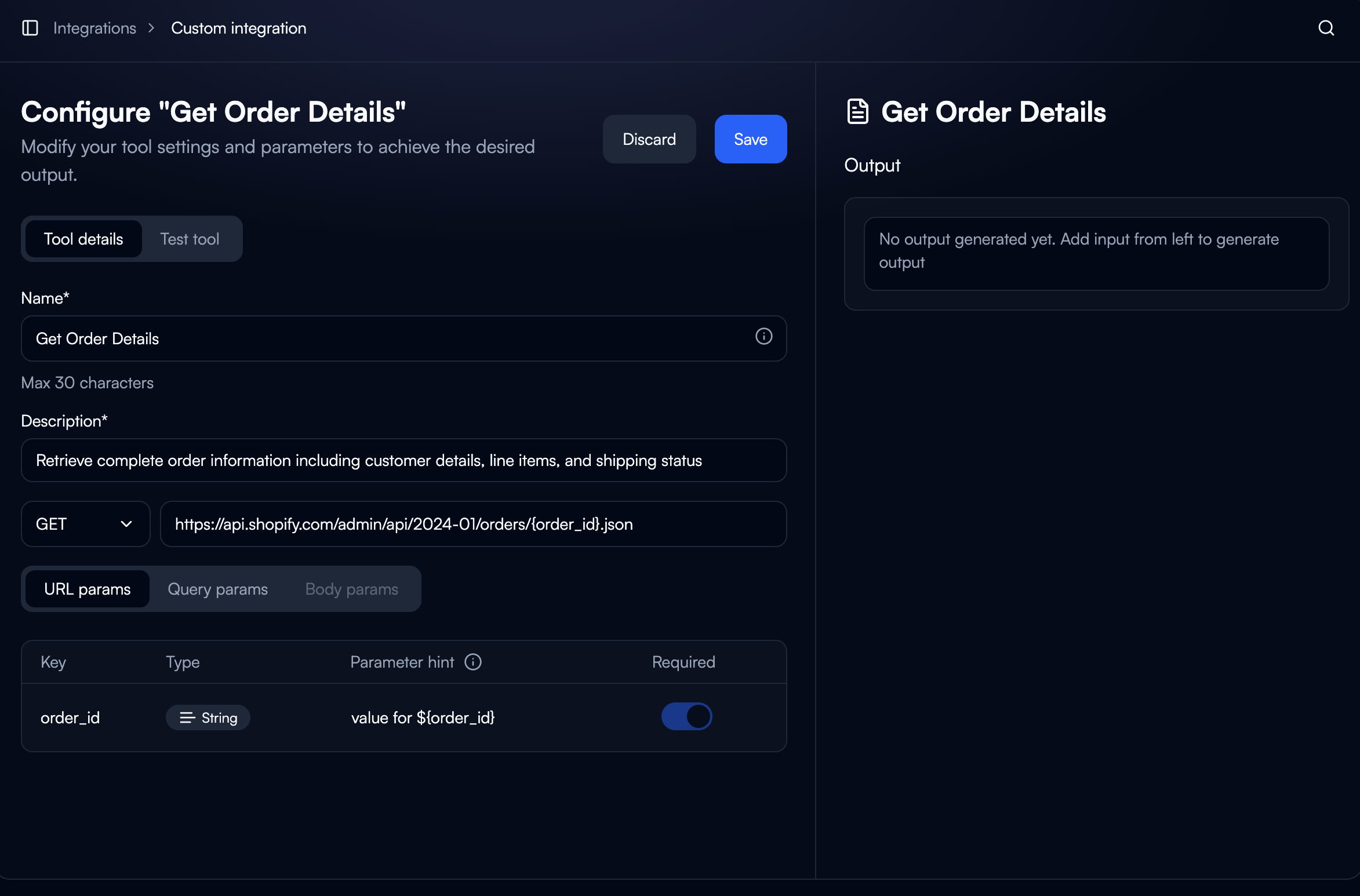
**API Endpoint:**
* HTTP Method: GET, POST, PUT, PATCH, DELETE
* Endpoint URL with parameter placeholders
* Example: `https://api.vendor.com/orders/{order_id}`
 **Parameters:**
* **URL**: Path variables (`{order_id}`)
* **Query**: URL parameters (`?status=completed`)
* **Body**: JSON for POST/PUT/PATCH
**Parameters:**
* **URL**: Path variables (`{order_id}`)
* **Query**: URL parameters (`?status=completed`)
* **Body**: JSON for POST/PUT/PATCH
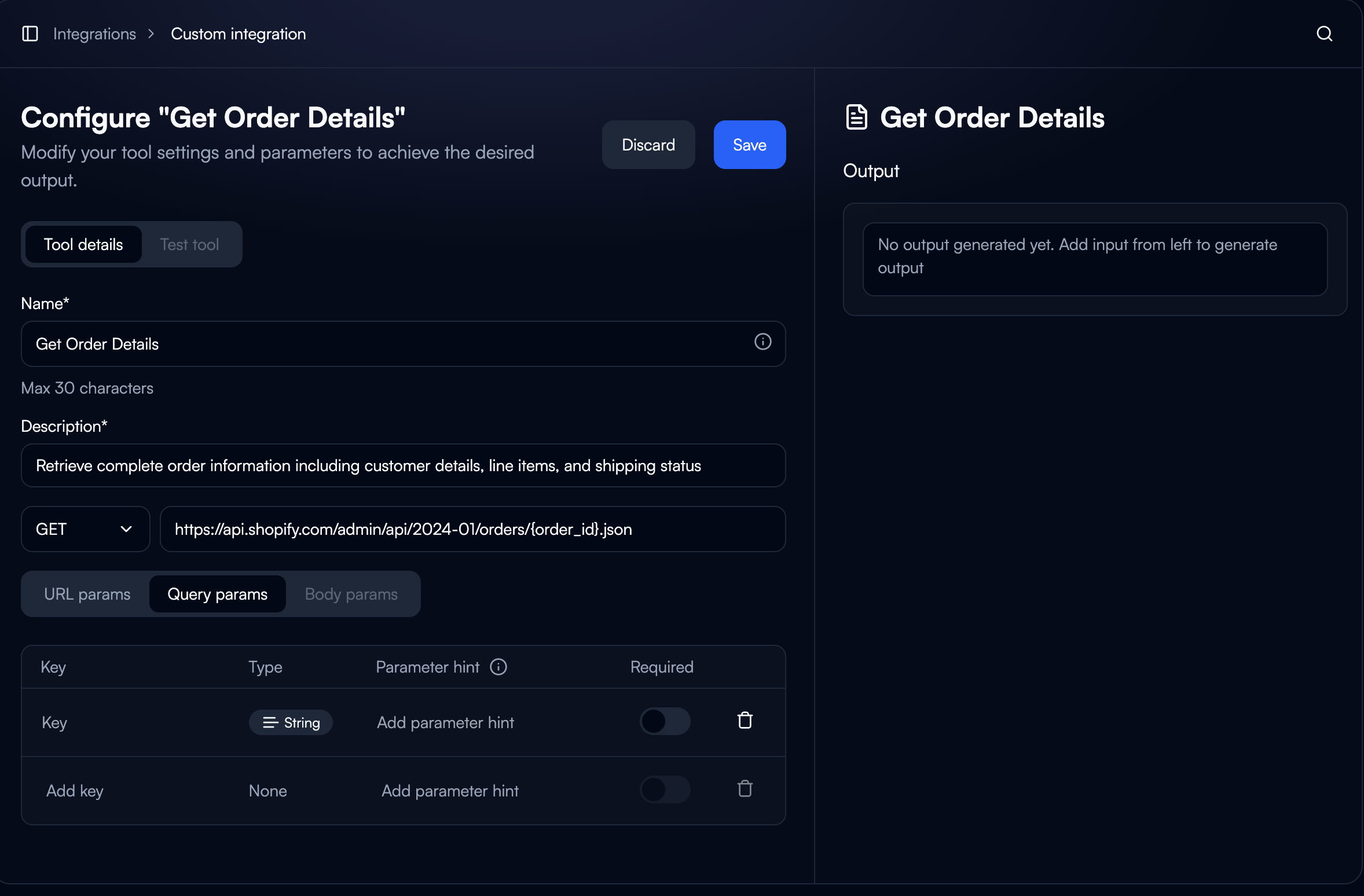 Each parameter needs:
* Key (name)
* Type (String, Number, Boolean, Object, Array)
* Parameter hint (AI context)
* Required toggle
**Test Tool**: Validate with sample values before saving
Select **Save** to create the integration. Select **Discard** to leave the builder without saving.
Each parameter needs:
* Key (name)
* Type (String, Number, Boolean, Object, Array)
* Parameter hint (AI context)
* Required toggle
**Test Tool**: Validate with sample values before saving
Select **Save** to create the integration. Select **Discard** to leave the builder without saving.
Using in Workflows
Adding Custom Integration to Nodes
1. **Select Tool**: Browse to your custom integration in node configuration
2. **Choose Action**: Pick specific API operation
3. **Map Inputs**: Use variable fill methods to pass data
4. **Select Connection**: Choose which credentials to use
Accessing Outputs
Custom integration outputs are accessible to downstream nodes:
```text theme={null}
${node_name.field_name}
```
**Example:**
```text theme={null}
Order ID: ${get_order.order_id}
Status: ${get_order.status}
Total: ${get_order.total}
```
Authentication Methods
API Key
Most common method. Configure where the key is sent:
* **Bearer**: `Authorization: Bearer {api_key}`
* **Header**: Custom header name
* **Query**: URL parameter
**Best Practice**: Use connection-level storage, rotate regularly, separate keys for environments
OAuth 2.0
Secure, user-authorized access:
**Authorization Code**: User explicitly authorizes, supports token refresh
**Client Credentials**: Machine-to-machine, no user authorization
**Required**: Authorization URL, Access Token URL, Scopes, Client ID/Secret
Basic
Username/password for legacy systems. Less secure than modern methods.
Schema Definition
OpenAPI Import
Fastest setup for documented APIs:
1. Provide OpenAPI spec URL
2. System generates tools automatically
3. Review and activate endpoints
Supports OpenAPI 3.0.x, 2.0 (Swagger), JSON or YAML
Manual Schema
For APIs without OpenAPI specs:
```json theme={null}
{
"tool_name": "Get Order Details",
"description": "Retrieve order information",
"required_extracted_args": [
"order_id: string // Order identifier"
],
"integration_provider_details": {
"request": {
"method": "GET",
"endpoint": "https://api.vendor.com/orders/{order_id}"
},
"response": {
"order_id": "{{result.data.id}}",
"status": "{{result.data.status}}"
}
}
}
```
Testing
**Test Tool Feature:**
1. Open tool configuration
2. Click "Test tool" tab
3. Provide sample values
4. Verify response structure
**Test in Workflow:**
* Build minimal flow with static data
* Run task manually
* Review execution results
* Verify data flows to next nodes
Common Errors
**401 Unauthorized**: Check credentials, token expiration, OAuth scopes
**400 Bad Request**: Verify required parameters, types, formats
**429 Too Many Requests**: Add delays, use caching, batch operations
**Request Timeout**: Check endpoint accessibility, optimize queries
Advanced Patterns
**Dynamic Endpoints**: Use variable substitution
```text theme={null}
https://api.vendor.com/tenants/{tenant_id}/orders/{order_id}
```
**Pagination**: Loop through pages, extract next token, aggregate results
**Response Transformation**: Use Custom GPT tools to process raw API data into structured outputs
Best Practices
**Security:**
* Never expose API keys in logs
* Separate credentials for dev/staging/prod
* Rotate credentials regularly
**Performance:**
* Minimize unnecessary requests
* Cache frequently accessed data
* Respect rate limits
**Maintenance:**
* Document API version in integration name
* Test after API updates
* Monitor provider changelogs
Examples
Internal CRM
* **Auth**: API Key (Header)
* **Tools**: Get Customer, Create Customer, Update Status
* **Use**: Workflow creates CRM record on signup
Legacy ERP
* **Auth**: Basic Authentication
* **Tools**: Query Inventory, Create PO, Update Status
* **Use**: Check inventory before order, create PO if low
Microservices
* **Auth**: OAuth 2.0 (Client Credentials)
* **Tools**: Process Order, Calculate Shipping, Validate Payment
* **Use**: E-commerce workflow orchestrates multiple services
Next Steps
Enable agents to call other agents for complex workflows
Learn about pre-built integration catalog
Design predictable output schemas for integrations
Enable agents to share data and coordinate workflows