> ## Documentation Index
> Fetch the complete documentation index at: https://docs.beam.ai/llms.txt
> Use this file to discover all available pages before exploring further.

# Publishing & Deployment

> Deploy agents to production and integrate with external applications using the Beam API

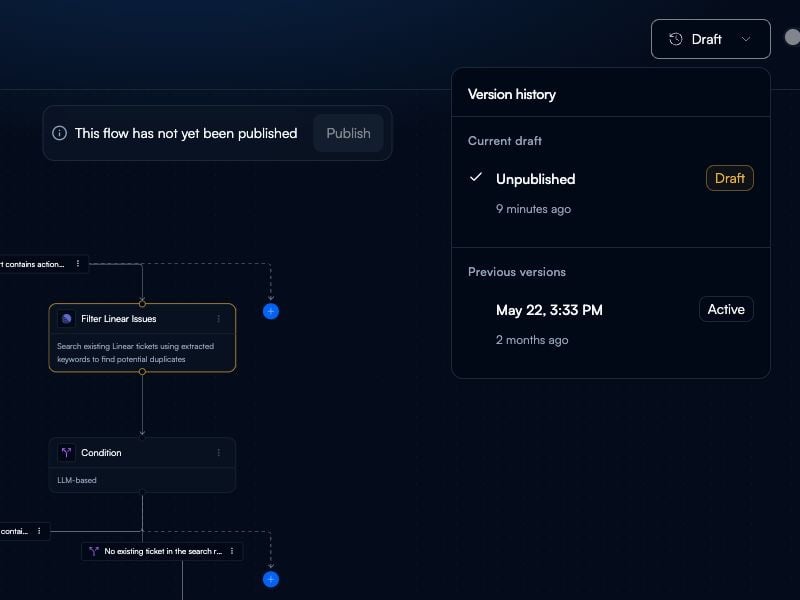
Once your agent is tested and ready, publish it to make it available for production use via the Beam platform or API.

## Publishing Your Agent

<Steps>
  <Step title="Test Your Agent">
    Run your agent with test inputs to verify all nodes execute correctly and outputs match expectations.
  </Step>

  <Step title="Publish">
    Click **Publish** in the agent builder to make your agent available for production use.

    Published agents can be:

    * Triggered via the Beam platform
    * Called through the API
    * Embedded in external applications
  </Step>

  <Step title="Get API Access">
    Navigate to **Settings → API Keys** to generate credentials for programmatic access.

    <Frame>
      <img src="https://mintcdn.com/beamai/19PRqq2Lu11IakoJ/02-building-agents/advanced-patterns/publishing-deployment/Screenshot%202025-11-07%20at%2021.01.30.png?fit=max&auto=format&n=19PRqq2Lu11IakoJ&q=85&s=fa9f0bc66a6353bad7cc57a2a5312843" alt="API key generation" width="2396" height="1440" data-path="02-building-agents/advanced-patterns/publishing-deployment/Screenshot 2025-11-07 at 21.01.30.png" />
    </Frame>
  </Step>
</Steps>

## Using the API

### Authentication

All API requests require an API key. Include your API key in request headers:

```bash theme={null}
x-api-key: YOUR_API_KEY
current-workspace-id: YOUR_WORKSPACE_ID
```

### Trigger Agent Task

```bash theme={null}
POST https://api.beamstudio.ai/agent-task
Content-Type: application/json

{
  "agent_id": "your-agent-id",
  "task_query": "Process this customer inquiry",
  "variables": {
    "customer_email": "user@example.com",
    "priority": "high"
  }
}
```

### Get Task Status

```bash theme={null}
GET https://api.beamstudio.ai/agent-task/{task_id}
```

## Deployment Best Practices

**Version Control:**

* Test changes in a duplicate agent before updating production
* Keep notes on configuration changes
* Maintain rollback versions for critical agents

**Monitoring:**

* Review task execution logs regularly
* Set up alerts for failed tasks
* Track performance metrics and execution times

**Security:**

* Rotate API keys periodically
* Use workspace-specific keys for different environments
* Never expose API keys in client-side code
* Restrict API key permissions to minimum required

**Scaling:**

* Monitor task volume and execution patterns
* Optimize long-running workflows
* Cache frequently accessed data
* Use batch operations where possible

## API Documentation

For complete API reference, authentication details, and endpoint documentation, see the [API Reference](/08-reference/api/overview/overview).

## Next Steps

<CardGroup cols={2}>
  <Card title="API Reference" icon="code" href="/08-reference/api/overview/overview">
    Complete API documentation and endpoints
  </Card>

  <Card title="Multi-Agent Collaboration" icon="diagram-project" href="/02-building-agents/advanced-patterns/multi-agent-collaboration/multi-agent-collaboration">
    Coordinate multiple agents in production
  </Card>

  <Card title="Triggers & Webhooks" icon="bolt" href="/03-running-operations/task-management/triggers-webhooks/triggers-webhooks">
    Automate agent execution with triggers and webhooks
  </Card>

  <Card title="Task Executions" icon="list-check" href="/03-running-operations/task-management/task-executions/task-executions">
    Monitor and track production tasks
  </Card>
</CardGroup>