> ## Documentation Index
> Fetch the complete documentation index at: https://docs.beam.ai/llms.txt
> Use this file to discover all available pages before exploring further.
# Structured Outputs
> Design predictable output schemas that transform AI responses into machine-readable data for reliable automation
Large language models are powerful but unpredictably creative. Ask for a customer ID and you might get a full sentence. Structured Outputs solve this by forcing the AI to return data in exact formats you define.
## Understanding Structured Outputs
Structured Outputs define output variables with specific data types that the AI must populate when executing a tool. This transforms conversational responses into clean, typed data.
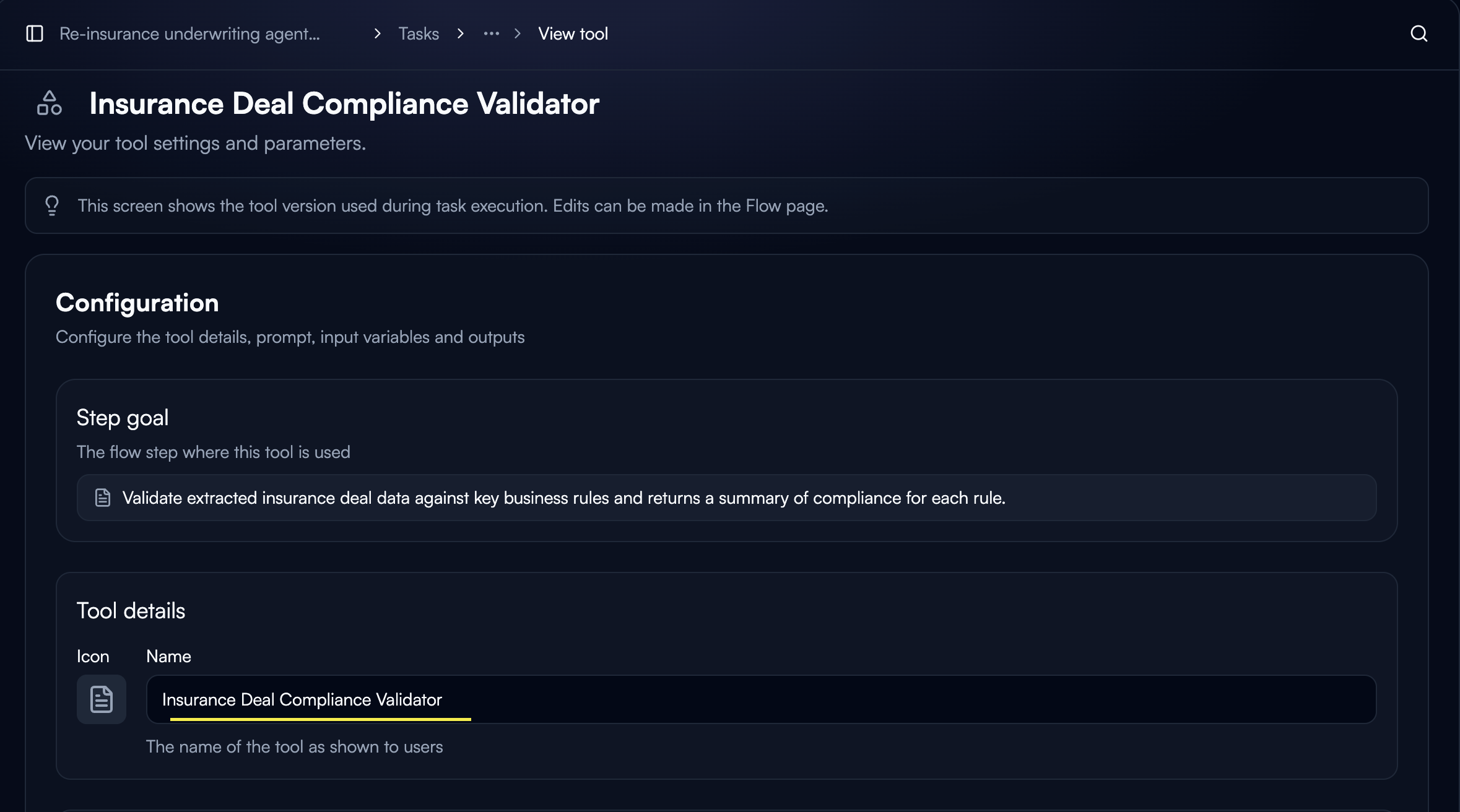 **Why Use Structured Outputs:**
* **Predictable formats**: AI returns data in exact structure you define
* **Type safety**: Guarantee data types match expectations
* **Easy linking**: Output variables become inputs for downstream nodes
* **Reduced errors**: Eliminate parsing and validation issues
## Configuring Output Variables
Output variables are defined at the tool level in Custom GPT tool configuration.
Open your Custom GPT tool settings and navigate to the **Output variables** section.
Click **"Add output"** to create a new output variable.
**Why Use Structured Outputs:**
* **Predictable formats**: AI returns data in exact structure you define
* **Type safety**: Guarantee data types match expectations
* **Easy linking**: Output variables become inputs for downstream nodes
* **Reduced errors**: Eliminate parsing and validation issues
## Configuring Output Variables
Output variables are defined at the tool level in Custom GPT tool configuration.
Open your Custom GPT tool settings and navigate to the **Output variables** section.
Click **"Add output"** to create a new output variable.
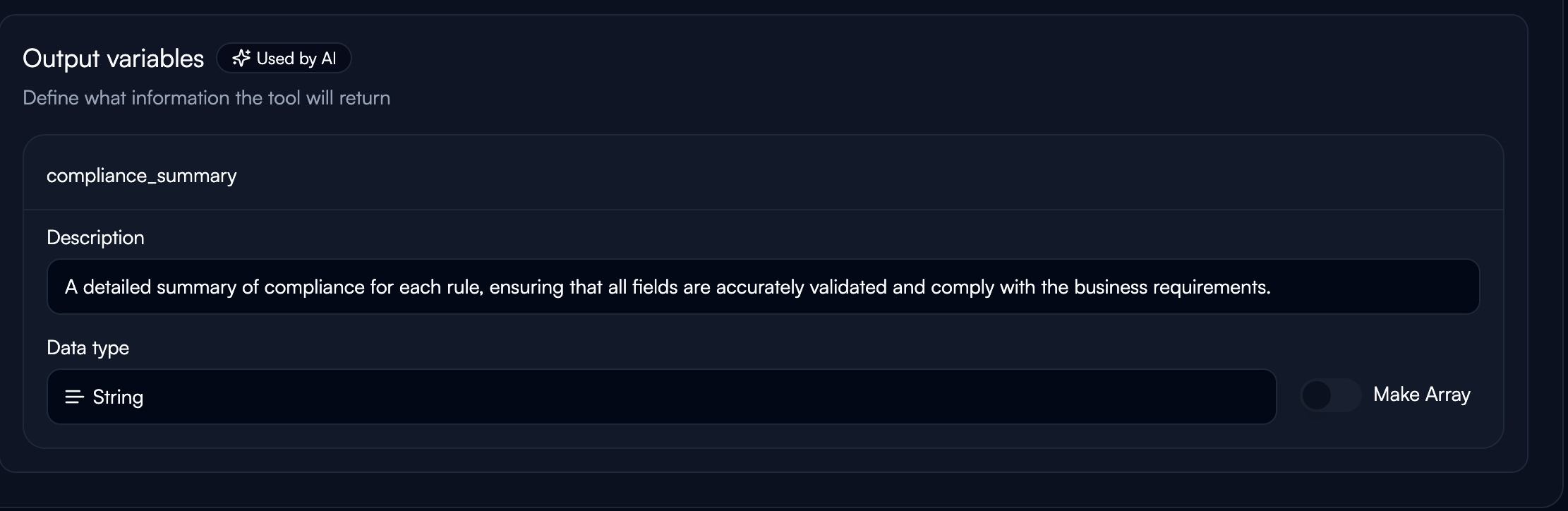 **Variable Name:**
* Use snake\_case naming (e.g., `customer_email`, `ticket_priority`)
* Must be unique within the tool
**Description:**
* Clear instruction for the AI on what to extract
* Be explicit and prescriptive
* Example: "Extract the customer's email address exactly as provided"
**Data Type:**
Select from available types: String, Number, Boolean, Object, Enum
**Variable Name:**
* Use snake\_case naming (e.g., `customer_email`, `ticket_priority`)
* Must be unique within the tool
**Description:**
* Clear instruction for the AI on what to extract
* Be explicit and prescriptive
* Example: "Extract the customer's email address exactly as provided"
**Data Type:**
Select from available types: String, Number, Boolean, Object, Enum
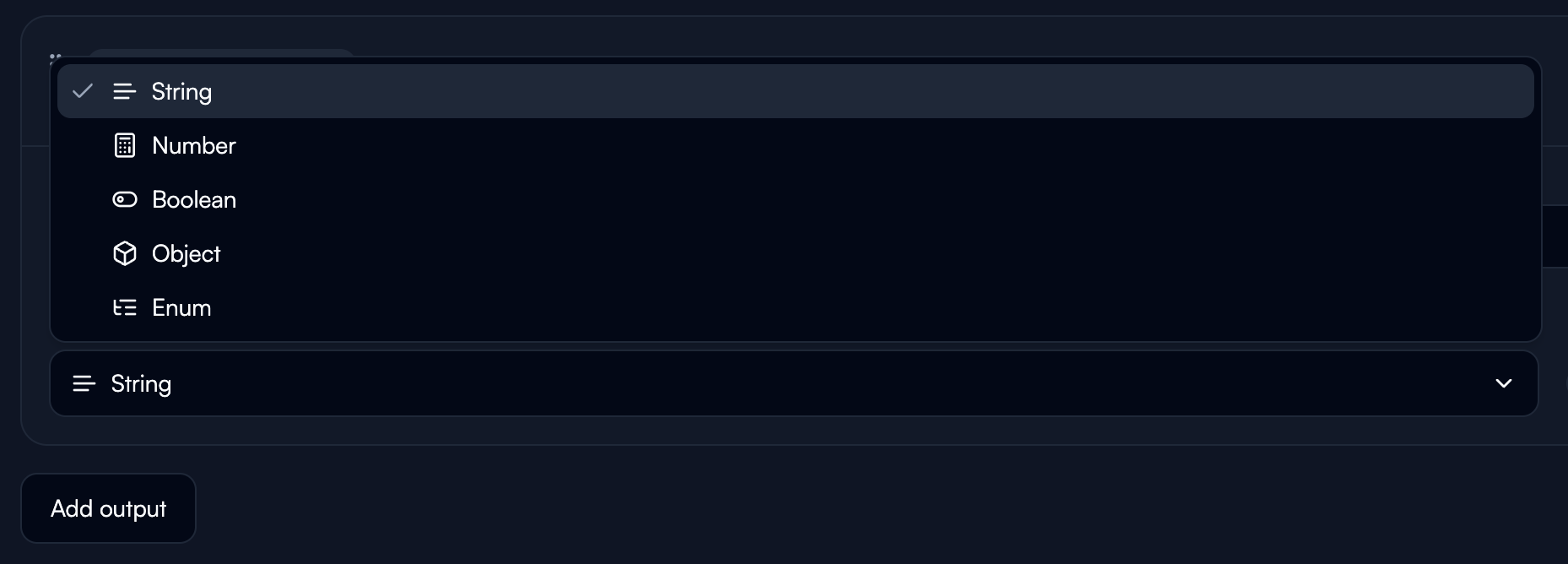 Add multiple output variables to structure complex data extraction.
**Example: Email Classification Tool**
```
category (String) - Email category (SALES, SUPPORT, BILLING)
priority (Number) - Priority level from 1-5
requires_response (Boolean) - Whether email needs reply
```
## Data Types
**String:** Text data of any length. Use for names, descriptions, categories.
**Number:** Numeric values including integers and decimals. Use for IDs, quantities, amounts, scores.
**Boolean:** True or false values. Use for flags, status indicators, yes/no determinations.
**Object:** Nested JSON structures for complex, grouped data.
**Example:**
```
Variable: customer_info
Type: Object
Description: Customer details as JSON with name, email, phone fields
```
Access nested fields:
```
${node_name.customer_info.name}
${node_name.customer_info.email}
```
**Enum:** Constrained to specific allowed values. Use for fixed categories, status values.
**Example:**
```
Variable: priority_level
Type: Enum
Allowed values: HIGH, MEDIUM, LOW
```
## Key Principles
### Sequential Processing
All outputs in one tool are generated in a single LLM call, processed sequentially. **Order matters.**
**Recommended order:**
1. Context gathering (if needed)
2. Reasoning/analysis fields
3. Intermediate extractions
4. Final answer fields
**Example:**
```json theme={null}
{
"request_summary": "",
"urgency_analysis": "",
"is_urgent": "",
"category_reasoning": "",
"category": "",
"priority": ""
}
```
### Reason First
Always place reasoning fields **before** extraction fields. This forces the model to analyze before concluding.
**Poor Design:**
```json theme={null}
{
"category": ""
}
```
**Better Design:**
```json theme={null}
{
"category_reasoning": "",
"category": ""
}
```
**Why it matters:**
* Dramatically improves accuracy
* Makes logic transparent and debuggable
* Reasoning can be stored for review
### Descriptions Are Directives
The description is a direct instruction to the AI. Be explicit.
**Examples:**
**Simple extraction:**
```
"Extract the 7-digit customer ID, numbers only"
```
**Conditional logic:**
```
"Extract language as ISO-639-1 code. If unknown, return 'N/A'"
```
**Constrained values:**
```
"Classify as one of: EXACT_MATCH, SIMILAR_MATCH, MISMATCH, or N/A"
```
### Unique Naming
Every output variable must have a unique name across your entire agent.
**Good naming:**
* `email_classifier_category`
* `invoice_extractor_total`
* `customer_analysis_id`
**Avoid:**
* `result`, `output`, `data` (too generic, likely duplicated)
## Linking Outputs to Downstream Nodes
Structured outputs create variables accessible in subsequent nodes.
Add multiple output variables to structure complex data extraction.
**Example: Email Classification Tool**
```
category (String) - Email category (SALES, SUPPORT, BILLING)
priority (Number) - Priority level from 1-5
requires_response (Boolean) - Whether email needs reply
```
## Data Types
**String:** Text data of any length. Use for names, descriptions, categories.
**Number:** Numeric values including integers and decimals. Use for IDs, quantities, amounts, scores.
**Boolean:** True or false values. Use for flags, status indicators, yes/no determinations.
**Object:** Nested JSON structures for complex, grouped data.
**Example:**
```
Variable: customer_info
Type: Object
Description: Customer details as JSON with name, email, phone fields
```
Access nested fields:
```
${node_name.customer_info.name}
${node_name.customer_info.email}
```
**Enum:** Constrained to specific allowed values. Use for fixed categories, status values.
**Example:**
```
Variable: priority_level
Type: Enum
Allowed values: HIGH, MEDIUM, LOW
```
## Key Principles
### Sequential Processing
All outputs in one tool are generated in a single LLM call, processed sequentially. **Order matters.**
**Recommended order:**
1. Context gathering (if needed)
2. Reasoning/analysis fields
3. Intermediate extractions
4. Final answer fields
**Example:**
```json theme={null}
{
"request_summary": "",
"urgency_analysis": "",
"is_urgent": "",
"category_reasoning": "",
"category": "",
"priority": ""
}
```
### Reason First
Always place reasoning fields **before** extraction fields. This forces the model to analyze before concluding.
**Poor Design:**
```json theme={null}
{
"category": ""
}
```
**Better Design:**
```json theme={null}
{
"category_reasoning": "",
"category": ""
}
```
**Why it matters:**
* Dramatically improves accuracy
* Makes logic transparent and debuggable
* Reasoning can be stored for review
### Descriptions Are Directives
The description is a direct instruction to the AI. Be explicit.
**Examples:**
**Simple extraction:**
```
"Extract the 7-digit customer ID, numbers only"
```
**Conditional logic:**
```
"Extract language as ISO-639-1 code. If unknown, return 'N/A'"
```
**Constrained values:**
```
"Classify as one of: EXACT_MATCH, SIMILAR_MATCH, MISMATCH, or N/A"
```
### Unique Naming
Every output variable must have a unique name across your entire agent.
**Good naming:**
* `email_classifier_category`
* `invoice_extractor_total`
* `customer_analysis_id`
**Avoid:**
* `result`, `output`, `data` (too generic, likely duplicated)
## Linking Outputs to Downstream Nodes
Structured outputs create variables accessible in subsequent nodes.
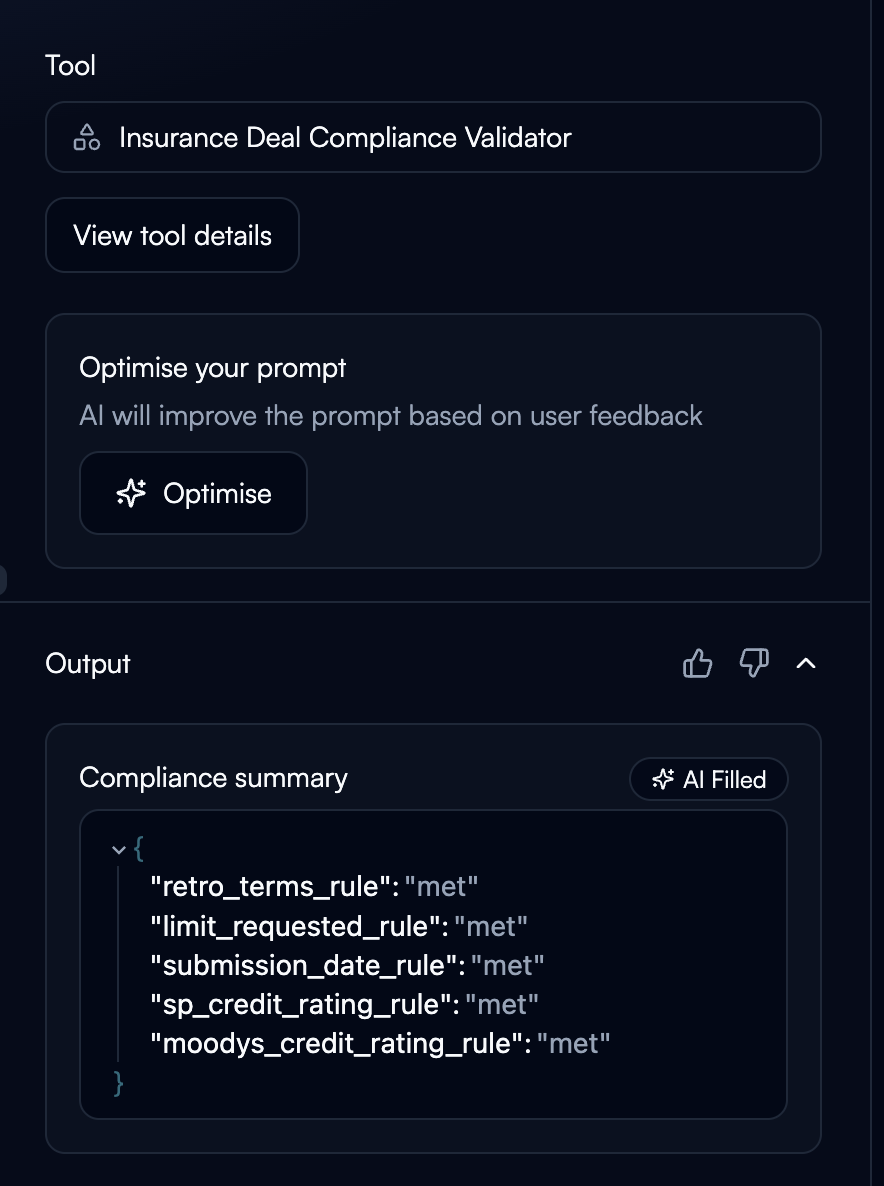 **Syntax:**
```
${node_name.variable_name}
```
**Example workflow:**
```
Node 1: classify_email
Outputs: category, priority, customer_email
Node 2: route_to_team
Input: ${classify_email.category}
Node 3: send_notification
Input: ${classify_email.customer_email}
```
See [Variables & State](/02-building-agents/agent-configuration/variables-state/variables-state) for detailed linking patterns.
## Common Patterns
**Classification + Data Extraction:**
```json theme={null}
{
"classification": "",
"customer_id": "",
"urgency_level": ""
}
```
Use: Branch workflow based on `classification`, pass `customer_id` to CRM lookup, use `urgency_level` for prioritization.
**Validation with Confidence:**
```json theme={null}
{
"extracted_value": "",
"confidence_score": "",
"needs_review": ""
}
```
Use: Branch on `needs_review` - high confidence → automate, low confidence → human review.
**Handling Arrays:**
For multiple items, structure as an array within an Object type:
```
Variable: products
Type: Object
Description: Array of products, each with name, sku, price, in_stock fields
```
AI returns:
```json theme={null}
{
"products": [
{"name": "Wireless Mouse", "sku": "WM-2024", "price": 29.99, "in_stock": true},
{"name": "USB Cable", "sku": "CABLE-6FT", "price": 12.99, "in_stock": false}
]
}
```
## Best Practices
**Naming Conventions:**
* Prefix with tool purpose: `email_classifier_category`, `invoice_extractor_total`
* Use descriptive names: `customer_priority_score` not `score`
* Avoid generic names: Don't use `result`, `output`, `data`
**Separation of Concerns:**
Don't combine everything into one field. Split outputs logically:
```json theme={null}
{
"customer_name": "",
"customer_email": "",
"order_id": "",
"priority": ""
}
```
**Error Handling:**
Design outputs to capture extraction confidence:
```json theme={null}
{
"extracted_date": "",
"date_confidence": "",
"extraction_notes": ""
}
```
**Performance Optimization:**
Minimize unnecessary reasoning fields in high-volume workflows. Use reasoning for critical extractions, skip for simple operations.
## Troubleshooting
**Issue:** AI returns string when you expected number
**Solutions:**
* Make description more explicit: "Extract as a number, digits only, no text"
* Check if source data actually contains the expected type
* Add validation in description: "If not a number, return 0"
**Issue:** AI returns dates in different formats
**Solutions:**
* Be prescriptive: "Return date in YYYY-MM-DD format exactly"
* Provide examples in description: "Format: 2024-01-15"
* Use constrained values (Enum) when possible
**Issue:** Some outputs are empty or null
**Solutions:**
* Add fallback instructions: "If not found, return 'N/A'"
* Check if AI has access to required input data
* Verify previous nodes are passing data correctly
**Issue:** Downstream node can't access structured output
**Solutions:**
* Verify unique variable naming across entire agent
* Check node execution completed successfully
* Review exact variable name (case-sensitive)
* Confirm data type compatibility
## Next Steps
Learn how to link structured outputs between nodes
Understand Custom GPT tools that use structured outputs
Pass structured outputs to external systems
Use structured outputs for branching and routing
**Syntax:**
```
${node_name.variable_name}
```
**Example workflow:**
```
Node 1: classify_email
Outputs: category, priority, customer_email
Node 2: route_to_team
Input: ${classify_email.category}
Node 3: send_notification
Input: ${classify_email.customer_email}
```
See [Variables & State](/02-building-agents/agent-configuration/variables-state/variables-state) for detailed linking patterns.
## Common Patterns
**Classification + Data Extraction:**
```json theme={null}
{
"classification": "",
"customer_id": "",
"urgency_level": ""
}
```
Use: Branch workflow based on `classification`, pass `customer_id` to CRM lookup, use `urgency_level` for prioritization.
**Validation with Confidence:**
```json theme={null}
{
"extracted_value": "",
"confidence_score": "",
"needs_review": ""
}
```
Use: Branch on `needs_review` - high confidence → automate, low confidence → human review.
**Handling Arrays:**
For multiple items, structure as an array within an Object type:
```
Variable: products
Type: Object
Description: Array of products, each with name, sku, price, in_stock fields
```
AI returns:
```json theme={null}
{
"products": [
{"name": "Wireless Mouse", "sku": "WM-2024", "price": 29.99, "in_stock": true},
{"name": "USB Cable", "sku": "CABLE-6FT", "price": 12.99, "in_stock": false}
]
}
```
## Best Practices
**Naming Conventions:**
* Prefix with tool purpose: `email_classifier_category`, `invoice_extractor_total`
* Use descriptive names: `customer_priority_score` not `score`
* Avoid generic names: Don't use `result`, `output`, `data`
**Separation of Concerns:**
Don't combine everything into one field. Split outputs logically:
```json theme={null}
{
"customer_name": "",
"customer_email": "",
"order_id": "",
"priority": ""
}
```
**Error Handling:**
Design outputs to capture extraction confidence:
```json theme={null}
{
"extracted_date": "",
"date_confidence": "",
"extraction_notes": ""
}
```
**Performance Optimization:**
Minimize unnecessary reasoning fields in high-volume workflows. Use reasoning for critical extractions, skip for simple operations.
## Troubleshooting
**Issue:** AI returns string when you expected number
**Solutions:**
* Make description more explicit: "Extract as a number, digits only, no text"
* Check if source data actually contains the expected type
* Add validation in description: "If not a number, return 0"
**Issue:** AI returns dates in different formats
**Solutions:**
* Be prescriptive: "Return date in YYYY-MM-DD format exactly"
* Provide examples in description: "Format: 2024-01-15"
* Use constrained values (Enum) when possible
**Issue:** Some outputs are empty or null
**Solutions:**
* Add fallback instructions: "If not found, return 'N/A'"
* Check if AI has access to required input data
* Verify previous nodes are passing data correctly
**Issue:** Downstream node can't access structured output
**Solutions:**
* Verify unique variable naming across entire agent
* Check node execution completed successfully
* Review exact variable name (case-sensitive)
* Confirm data type compatibility
## Next Steps
Learn how to link structured outputs between nodes
Understand Custom GPT tools that use structured outputs
Pass structured outputs to external systems
Use structured outputs for branching and routing