> ## Documentation Index
> Fetch the complete documentation index at: https://docs.beam.ai/llms.txt
> Use this file to discover all available pages before exploring further.

# Variable Fill

> Configure how data flows through your workflow with five fill methods: AI Fill, Static, User Fill, Linked, and From Memory

Variables control how data moves through your agent workflows. Every tool parameter requires a fill method that determines how the variable receives its value during execution.

## Understanding Variable Fill Methods

Variable fill methods define how data populates into tool parameters at runtime. Choosing the correct fill method ensures smooth data flow and accurate results.

<CardGroup cols={3}>
  <Card title="Linked" icon="link">
    Connect outputs from previous nodes to current tool inputs
  </Card>

  <Card title="AI Fill" icon="brain">
    Agent automatically extracts values from context and conversation
  </Card>

  <Card title="Static" icon="lock">
    Fixed values that remain constant across all executions
  </Card>

  <Card title="User Fill" icon="user">
    Values provided by users at runtime or via API
  </Card>

  <Card title="From Memory" icon="database">
    Retrieve values from agent's long-term memory and past interactions
  </Card>
</CardGroup>

## Fill Methods

### Linked

Connect outputs from previous nodes to inputs of current nodes. This is the primary method for chaining workflow steps together.

**How It Works:**

1. Previous node executes and generates output variables
2. Current node references those outputs by name
3. Values automatically flow when current node executes
4. No manual mapping required after initial setup

**When to Use:**

* Passing data between sequential workflow steps
* Using results from one tool as inputs to another
* Building multi-step processing pipelines
* Maintaining data continuity across nodes

**Configuration:**

```
Node A Output: customer_record
Node B Input: customer_data
Fill Method: Linked → Node A: customer_record
```

**Note:** Variables can also link non-sequentially (e.g., Step 2 output → Step 5's input) via linked variables. You're not limited to connecting only adjacent nodes.

**Example Workflow:**

```
Node 1: Retrieve Customer (Integration Connector)
├─ Output: customer_record {id, name, email, status}

Node 2: Analyze Customer Status (Custom GPT)
├─ Input: customer_info
└─ Fill Method: Linked → Node 1: customer_record
```

<Frame>
  <img src="https://mintcdn.com/beamai/19PRqq2Lu11IakoJ/02-building-agents/agent-configuration/variables-state/Screenshot%202025-11-04%20at%2000.11.23.png?fit=max&auto=format&n=19PRqq2Lu11IakoJ&q=85&s=c4f4590c295d6da1ec692fc3b6f0a592" alt="" width="908" height="1264" data-path="02-building-agents/agent-configuration/variables-state/Screenshot 2025-11-04 at 00.11.23.png" />
</Frame>

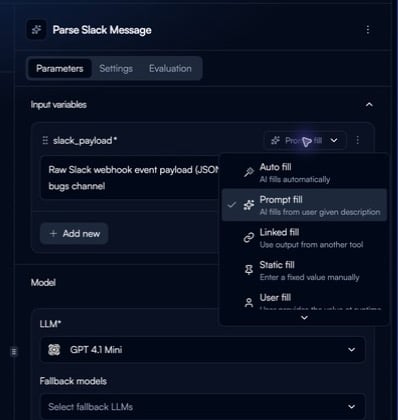
**Selecting Fill Method:**

When configuring a variable, you'll see the fill method dropdown with all 5 options:

<Frame>
  <img src="https://mintcdn.com/beamai/19PRqq2Lu11IakoJ/02-building-agents/agent-configuration/variables-state/Screenshot%202025-11-04%20at%2000.12.46.png?fit=max&auto=format&n=19PRqq2Lu11IakoJ&q=85&s=992fcd0cc3469236d00fab7c0cbda288" alt="" width="472" height="484" data-path="02-building-agents/agent-configuration/variables-state/Screenshot 2025-11-04 at 00.12.46.png" />
</Frame>

**Best Practices:**

* Link outputs don't have to be to the next node. Encourage matching keys within steps for accurate mapping
* Use descriptive variable names to track data provenance
* Verify data types match between output and input
* Check linked parameters appear in node execution logs

### AI Fill

AI automatically extracts or infers values from available context (conversation history, documents, memory).

**How It Works:**

1. Agent analyzes all available context
2. AI extracts relevant information based on parameter description
3. Value populates automatically without explicit mapping
4. Falls back to null if data not found

**When to Use:**

* Extracting information from unstructured text
* Inferring values from conversation context
* Processing document content
* Classifying or categorizing based on context

**Configuration:**

```
Parameter: customer_intent
Fill Method: AI Fill
Description: "Classify customer inquiry as: Sales, Support, Billing, or Other"
Context Source: Conversation history, uploaded documents
```

**Example:**

```
User Message: "I need help with my invoice from last month"

Tool Parameter: inquiry_category
Fill Method: AI Fill
Description: "Category of customer inquiry"

AI Populates: inquiry_category = "Billing"
```

**Best Practices:**

* Write clear parameter descriptions to guide AI extraction
* Enable memory lookup for richer context
* Provide examples in description for complex extractions
* Test with diverse inputs to verify accuracy

### Static

Fixed values that never change during workflow execution. Set once during configuration and remain constant.

**How It Works:**

1. Define value during tool configuration
2. Value remains identical across all executions
3. No runtime computation or lookup required
4. Fastest fill method (no processing overhead)

**When to Use:**

* API endpoints and URLs
* Configuration parameters
* Default values and fallbacks
* Business rules and thresholds
* System identifiers

**Configuration:**

```
Parameter: notification_email
Fill Method: Static
Value: "support@company.com"
```

**Common Use Cases:**

| Parameter         | Static Value                                               | Purpose                     |
| ----------------- | ---------------------------------------------------------- | --------------------------- |
| api\_endpoint     | "[https://api.company.com/v2](https://api.company.com/v2)" | API base URL                |
| default\_priority | "medium"                                                   | Fallback priority level     |
| company\_name     | "Acme Corporation"                                         | Standard company identifier |
| max\_retries      | 3                                                          | Error handling threshold    |
| email\_footer     | "© 2025 Company"                                           | Standard email signature    |

**Best Practices:**

* Use for values that truly never change
* Document why value is static (avoid future confusion)
* Review static values periodically for relevance
* Consider User Fill if value may need runtime override

### User Fill

Values provided explicitly when workflow executes through the user interface.

**How It Works:**

1. Workflow pauses at node requiring user fill
2. User provides value via interface
3. Validation rules check input (if configured)
4. Execution continues with provided value

**When to Use:**

* Form submissions and user inputs
* Runtime configuration during workflow execution
* Dynamic values that vary by execution
* Human intervention points in workflows

**Configuration:**

```
Parameter: order_id
Fill Method: User Fill
Required: true
Data Type: string
Validation: Must match format "ORD-XXXXX"
Description: "Order ID to process"
```

**Example Scenario:**

**User Input During Execution:**

```
Workflow pauses at approval step

User is prompted to provide:
- approval_decision: "approve" or "reject"
- approval_notes: "Approved for Q1 budget allocation"
- next_reviewer: "manager@company.com"

Workflow continues with provided values
```

**Best Practices:**

* Mark critical parameters as required
* Add validation rules to prevent errors
* Provide clear descriptions for UI display
* Set sensible default values when appropriate

### From Memory

Retrieve values from agent's memory system, including past interactions, learned preferences, and stored context.

**How It Works:**

1. Agent searches memory for relevant information
2. Retrieves data based on parameter description and memory keys
3. Uses semantic search to find best match
4. Returns most recent or relevant value found

**When to Use:**

* Accessing conversation history
* Retrieving user preferences
* Loading previous interaction data
* Building on past context

**Configuration:**

```
Parameter: customer_preferences
Fill Method: From Memory
Memory Lookup: Enabled
Context Window: Last 10 interactions
Description: "Customer's communication preferences and history"
```

**Best Practices:**

* Enable memory lookup in agent settings
* Use specific memory keys for faster retrieval
* Set appropriate context windows
* Combine with AI Fill for intelligent defaults

## Choosing the Right Fill Method

**Decision Framework:**

```
Does value come from previous node output?
└─> Use Linked

Is value always the same?
└─> Use Static

Does user provide value at runtime?
└─> Use User Fill

Should AI extract from context/documents?
└─> Use AI Fill

Should agent retrieve from memory?
└─> Use From Memory
```

**Common Patterns:**

| Tool Type               | Typical Fill Methods           |
| ----------------------- | ------------------------------ |
| First node in flow      | User Fill, Static, From Memory |
| Middle processing nodes | Linked, AI Fill                |
| Integration nodes       | Linked, Static                 |
| Final output nodes      | Linked, AI Fill                |

## Variable Data Types

All fill methods support multiple data types:

**Primitive Types:**

* String: Text values
* Number: Integers and decimals
* Boolean: true/false values
* Date: Timestamps and dates

**Complex Types:**

* Object: Nested key-value structures
* Array: Lists of values
* JSON: Structured data objects

<Frame>
  <img src="https://mintcdn.com/beamai/19PRqq2Lu11IakoJ/02-building-agents/agent-configuration/variables-state/Screenshot%202025-11-04%20at%2000.13.39.png?fit=max&auto=format&n=19PRqq2Lu11IakoJ&q=85&s=61dca7aeb2aaa54dfec6cc7985535fd0" alt="" width="1690" height="596" data-path="02-building-agents/agent-configuration/variables-state/Screenshot 2025-11-04 at 00.13.39.png" />
</Frame>

**Example Type Configurations:**

```json theme={null}
{
  "customer_email": {
    "type": "string",
    "fillMethod": "user_fill",
    "validation": "email"
  },
  "order_total": {
    "type": "number",
    "fillMethod": "linked",
    "source": "calculate_total.output.amount"
  },
  "is_priority": {
    "type": "boolean",
    "fillMethod": "ai_fill",
    "description": "Whether request is high priority"
  },
  "line_items": {
    "type": "array",
    "fillMethod": "linked",
    "source": "extract_items.output.items"
  }
}
```

## Validation and Error Handling

Ensure data quality with validation rules:

**Validation Types:**

**Format Validation:**

* Email addresses: `user@domain.com`
* Phone numbers: `+1-XXX-XXX-XXXX`
* URLs: `https://example.com`
* Custom regex patterns

**Range Validation:**

* Minimum/maximum values
* String length limits
* Array size constraints
* Date ranges

**Required vs Optional:**

* Required: Workflow fails if missing
* Optional: Continues with null/default

**Example Validation:**

```json theme={null}
{
  "email": {
    "fillMethod": "user_fill",
    "type": "string",
    "required": true,
    "validation": "email"
  },
  "age": {
    "fillMethod": "ai_fill",
    "type": "number",
    "min": 0,
    "max": 120
  },
  "tags": {
    "fillMethod": "linked",
    "type": "array",
    "minItems": 1,
    "maxItems": 10
  }
}
```

## Linked Records (Integration-Specific)

When working with database integrations (Airtable, databases), linked record fields require specific formatting.

**Airtable Linked Records:**

Linked record fields must be arrays of record IDs, even for single links:

```json theme={null}
{
  "linked_contact": {
    "fillMethod": "linked",
    "type": "array",
    "value": ["recABC123"]
  }
}
```

**Common Pattern:**

```
Node 1: Find Contact Record
├─ Output: contact_id = "recABC123"

Node 2: Update Invoice (Airtable)
├─ Field: Linked Contact
└─ Value: [contact_id]  // Must be array format
```

**Multiple Linked Records:**

```json theme={null}
{
  "related_projects": {
    "fillMethod": "linked",
    "type": "array",
    "value": ["recXYZ789", "recABC123", "recDEF456"]
  }
}
```

## Troubleshooting

<AccordionGroup>
  <Accordion title="AI Fill not populating variable">
    **Common Causes:**

    * Insufficient context available
    * Parameter description too vague
    * Memory lookup not enabled
    * Required data not in conversation

    **Solutions:**

    * Enhance parameter description with examples
    * Enable memory lookup in agent settings
    * Verify context contains required information
    * Use User Fill as fallback for critical data
  </Accordion>

  <Accordion title="Linked variable showing undefined">
    **Common Causes:**

    * Source node hasn't executed yet
    * Output variable name mismatch
    * Source node execution failed
    * Data type incompatibility

    **Solutions:**

    * Verify source node executed successfully
    * Check exact output variable name
    * Review node execution logs
    * Confirm data types match between nodes
  </Accordion>

  <Accordion title="User Fill validation failing">
    **Common Causes:**

    * Input doesn't match validation rules
    * Data type mismatch
    * Required field not provided
    * Custom regex pattern too strict

    **Solutions:**

    * Review validation rules and test cases
    * Provide clear error messages
    * Add examples to parameter description
    * Adjust validation patterns if needed
  </Accordion>

  <Accordion title="From Memory returns empty">
    **Common Causes:**

    * Memory lookup not enabled
    * No relevant data in memory
    * Memory key doesn't exist
    * Context window too narrow

    **Solutions:**

    * Enable memory lookup in agent configuration
    * Expand context window size
    * Use specific memory keys
    * Combine with AI Fill as fallback
  </Accordion>

  <Accordion title="Airtable linked records failing">
    **Common Causes:**

    * Record ID not in array format
    * Invalid record ID format
    * Record doesn't exist
    * Permission issues

    **Solutions:**

    * Ensure IDs are in array: `["recXXX"]`
    * Verify record exists in Airtable
    * Check field is configured as linked record type
    * Confirm API permissions allow linking
  </Accordion>
</AccordionGroup>

## Best Practices

**Fill Method Selection:**

* Default to Linked for chaining nodes
* Use AI Fill for unstructured data extraction
* Reserve Static for truly constant values
* Enable User Fill only when runtime input needed
* Leverage From Memory for personalization

**Variable Naming:**

* Use descriptive, consistent names
* Follow naming conventions (snake\_case recommended)
* Include data type hints in complex objects
* Avoid abbreviations unless standard

**Performance Optimization:**

* Minimize AI Fill usage (slower than other methods)
* Use Static where possible (fastest)
* Cache From Memory results
* Batch User Fill prompts together

**Error Handling:**

* Set required fields appropriately
* Provide meaningful validation messages
* Add fallback values where sensible
* Test with edge cases and missing data

## Next Steps

<CardGroup cols={2}>
  <Card title="Selecting Tools" icon="wrench" href="/02-building-agents/agent-fundamentals/tools-integrations/tools-integrations">
    Choose and configure tools that use variable fill
  </Card>

  <Card title="Creating Flows" icon="diagram-project" href="/02-building-agents/agent-fundamentals/flow-configuration/flow-configuration">
    Design workflows that leverage variable fill methods
  </Card>

  <Card title="Integrations" icon="plug" href="/02-building-agents/agent-configuration/integrations/integrations">
    Configure integration-specific variable patterns and connectors
  </Card>

  <Card title="Custom Integrations" icon="code" href="/02-building-agents/advanced-patterns/custom-integrations/custom-integrations">
    Build custom API connections for advanced integration patterns
  </Card>
</CardGroup>