> ## Documentation Index
> Fetch the complete documentation index at: https://docs.beam.ai/llms.txt
> Use this file to discover all available pages before exploring further.
# Monitoring
> Configure task-status notifications for an agent by choosing a schedule, channel, task statuses, and whether to include test tasks.
Monitoring lets you configure notifications for an agent's tasks. You choose when Beam sends a notification, which task statuses trigger it, and whether tasks run in test mode are included.
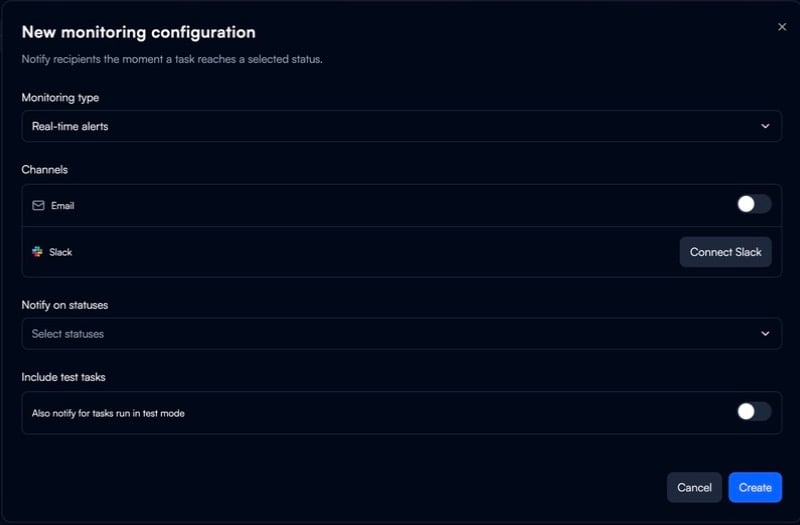
Create a monitoring configuration
1. Open the agent's **Configuration**.
2. Select **Monitoring**.
3. Select **Create configuration**.
4. Choose a monitoring type.
5. Enable **Email** or connect **Slack**.
6. Select the task statuses that should trigger the notification.
7. Choose whether to include tasks run in test mode, then select **Create**.
Monitoring types
| Type | Use it to |
| ---------------- | ---------------------------------------------------------- |
| Real-time alerts | Send a notification when a task reaches a selected status. |
| Daily report | Receive a daily report. |
| Weekly report | Receive a weekly report. |
| Monthly report | Receive a monthly report. |
Notification channels
The configuration form includes an **Email** toggle and a **Connect Slack** option. Connect Slack before using Slack as the notification channel.
Task statuses
Choose one or more task statuses for the configuration:
* Completed
* Failed
* Input required
* Consent required
* Authentication required
* Insufficient credits
* Aborted
Include test tasks
Enable **Include test tasks** to also notify for tasks run in test mode.
See also
* [Task Executions](/03-running-operations/task-management/task-executions/task-executions)
* [Analytics](/04-observability-analytics/overview-analytics/overview-analytics)