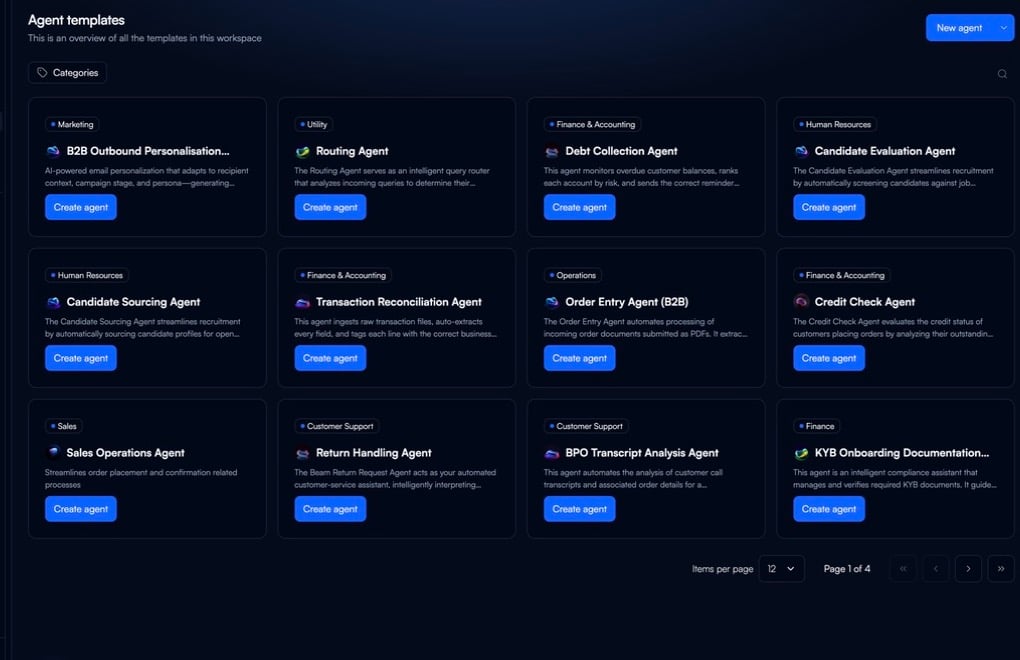
Deploy your first AI agent using Beam’s template system. Templates provide pre-configured workflows with integrated LLM infrastructure, integrations, and monitoring.

Before You Begin

Ensure you have:
  • Active Beam workspace with appropriate permissions
  • Modern browser (Chrome, Firefox, Safari, Edge)
  • Basic understanding of your automation goal

Build Your First Agent

1

Select a Template

Navigate to your Beam dashboard and access the template gallery.Available Templates:
  • Customer service automation
  • Data processing workflows
  • Report generation
  • Email management
  • Document analysis
Click “Create Agent” and select a template matching your use case.
2

Configure Your Agent

Customize the template using the visual flow builder.Configuration Options:
  • Agent Instructions: Define goals and constraints
  • Flows: Modify the workflow graph
  • Input Variables: Specify data sources and formats
  • Output Formats: Configure result structure
  • Execution Triggers: Set scheduling or event-based activation
Changes update the visual graph in real-time.
3

Connect Integrations

Add integrations from Beam’s 1500+ pre-built connectors. Authentication, rate limiting, and error handling are managed by the platform.Integration Process:
  1. Select required integrations from the catalog
  2. Authorize connections through OAuth flows
  3. Map data fields between systems
  4. Configure retry and fallback behaviors
Common Integrations:
  • Email (Gmail, Outlook, Exchange)
  • CRM (Salesforce, HubSpot)
  • Databases (PostgreSQL, MongoDB)
  • Storage (S3, Google Drive, Dropbox)
  • Communication (Slack, Teams)
4

Test Your Agent

Create test tasks to verify agent execution.Testing Workflow:
  1. Click “Create Task” from the agent dashboard
  2. Provide input data
  3. Monitor real-time execution through the visual flow
  4. Review output quality and execution time
  5. Inspect node-level logs for debugging
5

Review and Optimize

Analyze test results before production deployment.Optimization Checklist:
  • Output quality meets requirements
  • Execution time within acceptable limits
  • Error handling covers edge cases
  • Integration mappings validated
  • Fallback procedures defined
6

Publish Your Agent

Make your agent accessible via API.Publishing Process:
  1. Click “Publish Agent” to generate API endpoint
  2. Agent becomes accessible via public URL with API key authentication
  3. Example: https://app.beam.ai/public/chat/{agent-id}?apiKey=[API_KEY]
What You Get:
  • Public API endpoint
  • API key authentication
  • Integration with your applications
  • Access control management

Example: Customer Service Email Agent

Build customer service automation using the Customer Service Agent template. Use Case: Automatically classify emails and generate draft responses for human review. Workflow:
Email Ingestion → Content Analysis → Classification → Response Generation → Human Review
Pre-configured:
  • OAuth authentication with Gmail/Outlook
  • Automatic polling or webhook triggers
  • Email parsing and metadata extraction
Your Customization:
  • Select inbox to monitor
  • Define filtering criteria
  • Set execution frequency
Pre-configured:
  • NLP-based content extraction
  • Sentiment analysis
  • Intent detection
  • Entity recognition
Your Customization:
  • Define business-specific entities
  • Adjust sentiment thresholds
  • Configure priority scoring
Pre-configured:
  • Multi-label classification
  • Confidence scoring
  • Fallback handling
  • Auto-escalation for low confidence
Your Customization:
  • Define categories
  • Set confidence thresholds
  • Map categories to templates
Pre-configured:
  • Context-aware drafting
  • Tone consistency
  • Template variable filling
  • Compliance filters
Your Customization:
  • Upload response guidelines
  • Define brand voice
  • Configure templates
  • Set response length
Pre-configured:
  • Slack/Teams notifications
  • Approval workflow
  • Escalation routing
  • Audit trail
Your Customization:
  • Define team assignments
  • Set SLA timers
  • Configure actions
  • Map escalation paths

Troubleshooting

Common Issues:
  • Input Validation: Check formats match expected schema
  • Integration Errors: Verify OAuth tokens and API credentials
  • Flow Logic: Review node connections and conditional logic
  • Logs: Access detailed logs from agent dashboard
Optimization:
  • Prompts: Use optimization feature to test variations
  • Input Quality: Add preprocessing nodes for data cleaning
  • Model Selection: Review routing decisions, manually specify models
  • Feedback: Enable HITL review for low-confidence outputs
Solutions:
  • Speed: Identify slow nodes, optimize prompts, enable parallel execution
  • Scaling: Configure concurrency limits, enable auto-scaling
  • Monitoring: Track resource usage patterns

Next Steps