

The Analytics dashboard provides real-time visibility into agent performance across key metrics—completion rates, evaluation scores, runtime, and user feedback—enabling data-driven optimization decisions.Documentation Index
Fetch the complete documentation index at: https://docs.beam.ai/llms.txt
Use this file to discover all available pages before exploring further.
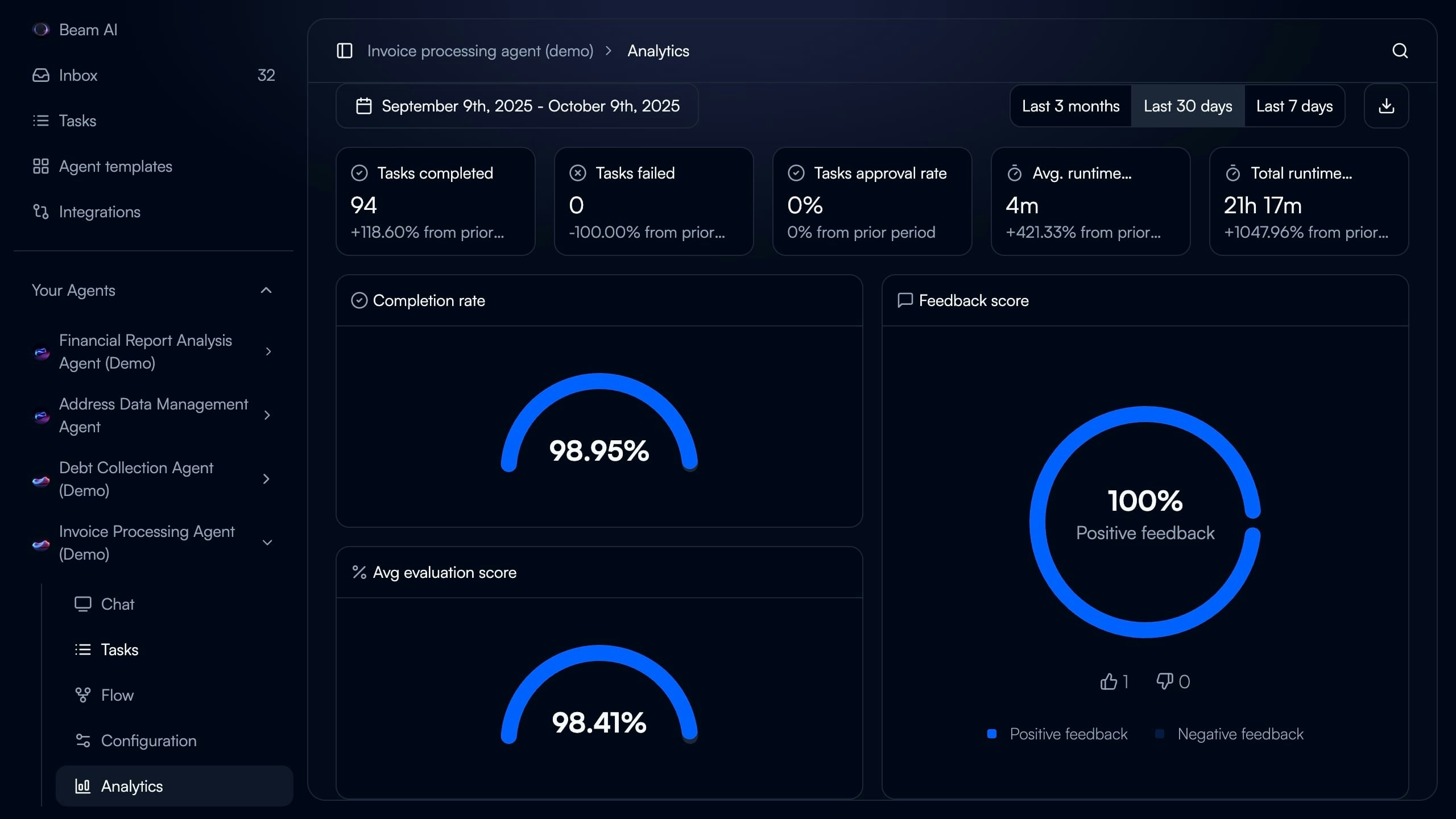
Understanding the Analytics Dashboard
Access comprehensive performance insights for any agent by navigating to Analytics in the agent sidebar. Date Range Selector - Filter metrics by Last 7 days, Last 30 days, or Last 3 months to track performance trends Key Performance Metrics - Six primary indicators displayed at dashboard top:- Tasks completed
- Tasks failed
- Tasks approval rate (for HITL workflows)
- Average runtime per task
- Total runtime across all tasks
- Completion rate percentage
- Completion rate (percentage of tasks finishing successfully)
- Average evaluation score (mean accuracy across all evaluated nodes)
- Feedback score (positive vs negative user ratings)
Key Metrics Explained
Tasks Completed
What it measures: Total number of tasks that executed successfully and reached completion without errors. Dashboard display: Numeric count with percentage change from prior period (e.g., “+118.60% from prior period”) What to monitor:- Steady growth indicates healthy agent adoption
- Sudden drops may signal workflow issues or reduced triggering
- Compare against tasks failed to calculate success rate
- Task Executions - View individual task details and execution logs
Tasks Failed
What it measures: Total number of tasks that encountered errors and did not complete successfully. Dashboard display: Numeric count with percentage change from prior period (e.g., “-100.00% from prior period” when zero failures) What to monitor:- Target: 0 failures or <5% failure rate
- Investigate any non-zero values immediately
- Use Debug Tools to diagnose failures
- Integration authentication errors
- Missing required input data
- Timeout errors on complex workflows
- API rate limiting
- Debug Tools - Diagnose and resolve execution errors
- Rerunning Tasks - Retry failed tasks after fixes
Tasks Approval Rate
What it measures: Percentage of tasks requiring human approval that were approved vs rejected in HITL workflows. Dashboard display: Percentage with change from prior period (e.g., “0% from prior period”) What to monitor:- High rejection rates (>20%) indicate agent output quality issues
- Use rejected task feedback to improve prompts
- Consider adding Evaluation Criteria to catch issues before human review
- Only visible for agents with Automation Modes configured for human-in-the-loop (HITL)
- Shows 0% if no approval checkpoints configured
- Automation Modes - Configure HITL approval checkpoints
Average Runtime
What it measures: Mean execution time per task from trigger to completion. Dashboard display: Duration in minutes and seconds (e.g., “4m”) with percentage change from prior period What to monitor:- Baseline your typical runtime for the agent’s workflow complexity
- Sudden increases may indicate:
- Integration slowdowns
- Increased prompt complexity
- Model performance degradation
- Network latency issues
- Review slow nodes using execution logs
- Simplify prompts where possible
- Use faster LLM models for non-critical steps
- Implement parallel execution for independent tasks
Total Runtime
What it measures: Cumulative execution time across all completed tasks in the selected date range. Dashboard display: Duration in hours and minutes (e.g., “21h 17m”) with percentage change What this indicates:- Overall agent workload and resource consumption
- High values with high task counts = good adoption
- High values with low task counts = workflow inefficiency
Completion Rate
What it measures: Percentage of tasks that finished successfully out of total tasks attempted. Dashboard display: Large circular gauge showing percentage (e.g., “98.95%”) Target benchmarks:- 95-100%: Excellent - Agent highly reliable
- 90-94%: Good - Minor optimization opportunities
- 85-89%: Acceptable - Investigate frequent failure patterns
- <85%: Needs attention - Significant reliability issues
(Tasks Completed / (Tasks Completed + Tasks Failed)) × 100
How to improve:
- Identify and fix common failure patterns using Debug Tools
- Add error handling and retry logic to workflow nodes
- Validate integrations are properly authenticated
- Use Test Datasets to catch issues before production
- Debug Tools - Systematic error diagnosis
- Rerunning Tasks - Retry and validate fixes
Average Evaluation Score
What it measures: Mean accuracy percentage across all nodes with evaluation criteria configured. Dashboard display: Large circular gauge showing percentage (e.g., “98.41%”) Target benchmarks:- 95-100%: Excellent - Evaluation criteria well-calibrated
- 90-94%: Good - Minor prompt optimization opportunities
- 85-89%: Acceptable - Review criteria strictness and prompt quality
- <85%: Needs improvement - Systematic quality issues
- How well agent outputs match defined quality standards
- Effectiveness of evaluation criteria configuration
- Need for prompt optimization
- Use Optimize Outputs to automatically improve underperforming nodes
- Review and refine evaluation criteria for balance between strictness and practicality
- Enable auto-run on low-scoring nodes for self-healing
- Analyze failed evaluations to identify patterns
- Only shows data for agents with Evaluation Framework criteria configured
- Empty if no evaluation criteria defined on any workflow nodes
- Evaluation Framework - Configure validation criteria and auto-run
- Optimize Outputs - AI-powered prompt optimization
Feedback Score
What it measures: User satisfaction with agent outputs based on thumbs up/down ratings. Dashboard display: Large circular gauge showing percentage positive (e.g., “100% Positive feedback”) with breakdown of positive (👍) vs negative (👎) counts Target benchmarks:- 90-100%: Excellent - Users highly satisfied with outputs
- 80-89%: Good - Minor quality improvements needed
- 70-79%: Acceptable - Address common user complaints
- <70%: Needs attention - Systematic output quality issues
- Thumbs up/down buttons on task execution results
- Feedback captured per task or per workflow step
- Comments can accompany ratings for qualitative insights
- Review negative feedback comments to identify common issues
- Use feedback to refine prompts and evaluation criteria
- Implement feedback-driven optimization via Optimize Outputs
- Consider if evaluation criteria align with user expectations
- Optimize Outputs - Learn from user feedback to improve prompts
Using Analytics for Optimization
Identifying Performance Issues
Low Completion Rate + High Failures:- Issue: Workflow reliability problems
- Action: Use Debug Tools to diagnose common failure patterns
- Validation: Create Test Datasets covering failure scenarios
- Issue: Agent completing tasks but with poor quality
- Action: Use Optimize Outputs to improve underperforming nodes
- Validation: Review Evaluation Framework criteria for balance
- Issue: Evaluation criteria don’t match user expectations
- Action: Review negative feedback comments and adjust evaluation criteria
- Validation: Incorporate user feedback patterns into evaluation rules
- Issue: Workflow inefficiency limiting adoption
- Action: Identify slow nodes in execution logs and optimize prompts or use faster models
- Validation: Monitor runtime trends after optimization
Tracking Improvement Trends
After Prompt Optimization:- Note baseline evaluation score and completion rate
- Apply optimization via Optimize Outputs
- Monitor analytics for 7-14 days
- Expect 10-40% improvement in evaluation scores
- Document successful optimization patterns
- Baseline period shows no evaluation score
- After criteria deployment, evaluation score appears
- Initial scores typically 70-85% as criteria are calibrated
- Use auto-run to self-heal low scores
- Scores stabilize at 90-95% after 2-4 weeks
- Approval rate metric appears
- Initial rejection rates often 15-30% as agents learn
- Use rejection feedback to refine prompts
- Target 5-10% rejection rate for mature agents
- High approval rates indicate agents ready for full automation
Best Practices
Regular Monitoring Schedule
Regular Monitoring Schedule
Daily (for new agents):
- Check completion rate and failure count
- Review any failed tasks immediately
- Monitor evaluation scores for instability
- Review all key metrics for trends
- Compare current week vs prior week performance
- Investigate any metric degradation >10%
- Celebrate improvements with stakeholders
- Analyze trends across 30-day and 3-month views
- Identify seasonal patterns or usage changes
- Plan optimization initiatives based on data
- Review and update evaluation criteria if needed
Setting Baseline Metrics
Setting Baseline Metrics
New Agent Baseline (First 30 Days):
- Completion rate: 85-90% acceptable as agent stabilizes
- Evaluation score: 75-85% during calibration
- Feedback score: 80-90% as users learn agent capabilities
- Average runtime: Establish typical duration for workflow complexity
- Completion rate: 95%+
- Evaluation score: 90%+
- Feedback score: 90%+
- Average runtime: Within 10% of baseline
- Record initial metrics when agent goes live
- Note any major workflow changes affecting comparability
- Use baselines to calculate ROI and improvement percentages
Responding to Metric Changes
Responding to Metric Changes
Sudden Drops (>20% decrease overnight):
- Likely causes: Integration outage, authentication failure, upstream system change
- Action: Check recent workflow changes, verify integrations, review execution logs
- Urgency: High - investigate within 1 hour
- Likely causes: Data drift, prompt degradation, evaluation criteria misalignment
- Action: Analyze recent task executions, run test datasets, consider re-optimization
- Urgency: Medium - investigate within 1 day
- Likely causes: New trigger source, increased adoption, duplicate triggering
- Action: Verify expected behavior, check for duplicate task creation, validate trigger configuration
- Urgency: Medium - investigate within 1 day
- Likely causes: Stable agent performance OR lack of usage
- Action: Verify task triggering is occurring, check if usage patterns changed
- Urgency: Low - review during weekly check-in
Comparing Across Agents
Comparing Across Agents
Benchmarking Similar Agents:
- Compare completion rates for agents handling similar complexity
- Identify highest-performing agents and analyze their prompts/configuration
- Use top performers as templates for new agents
- Simple (1-3 nodes): Target 98%+ completion, 95%+ evaluation
- Medium (4-8 nodes): Target 95%+ completion, 90%+ evaluation
- Complex (9+ nodes): Target 92%+ completion, 88%+ evaluation
- Invoice processing: 95%+ completion, 95%+ evaluation
- Email triage: 97%+ completion, 90%+ evaluation
- Data extraction: 90%+ completion, 93%+ evaluation
- Customer inquiry: 93%+ completion, 88%+ evaluation
Next Steps
Evaluation Framework
Set up evaluation criteria to measure and track output quality
Optimize Outputs
Use AI to improve agent accuracy when evaluation scores are low
Task Executions
Drill into individual task details and execution logs
Debug Tools
Diagnose and resolve failures affecting completion rate